⌁
Pick it. Pin it. Carry on.
Choose your everyday input source and turn on keeping. When the source changes, KeyPin tries to bring your choice back.
 KeyPin
Switch apps. Keep your train of thought. KeyPin holds your chosen input source in the Mac menu bar, so every sentence starts in a familiar place.
macOS 26+·Apple silicon·v1.13
KEEP YOUR INPUT. KEEP YOUR FLOW.
Writing, browsing, running a command. Let KeyPin take care of checking your input source again and again.
Choose your everyday input source and turn on keeping. When the source changes, KeyPin tries to bring your choice back.
Choose Follow system to switch freely. Your previous choice is remembered for whenever you want it back.
A native Liquid Glass interface with your current input source icon. It keeps running when you close the window, with optional launch at login.
A LITTLE HANDS-ON
Choose an input source, then click through the apps. Turn keeping off to see the difference.
Interactive illustration. This does not change your device’s input source. Actual behavior varies by app and input method.
Keep your attention on the next idea.
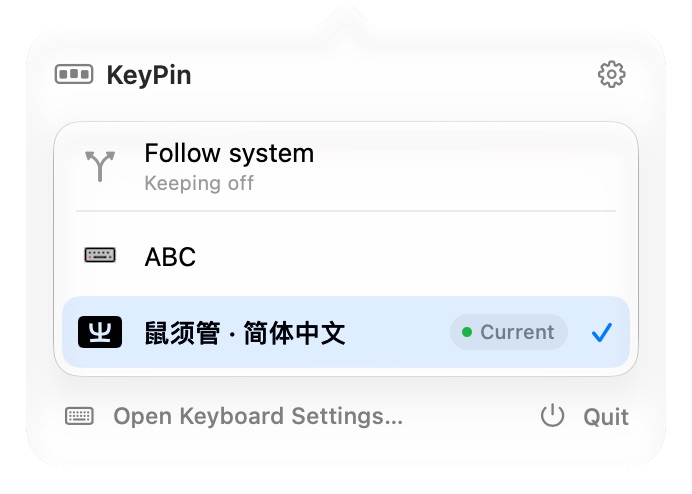 Native interface preview · Example input sources
NO COMPLICATED SETUP
Pick from the input sources already available on your Mac. Search the list when you have more to choose from.
Confirm whether to start keeping now and launch at login. Need a break? Choose Follow system in the panel.
FITS YOUR WORKFLOW, TOO
Once the command entry is configured, check status, pause or resume keeping. JSON output makes it easy to use in your own scripts.
$keypin status --json$keypin pause$keypin resume
FAQ
The current download is KeyPin 1.13 for macOS 26 or later on Apple silicon (M1 and newer). An Intel build is not currently provided.
KeyPin keeps one globally chosen input source. It does not provide per-app input rules. Follow system stops keeping without actively changing the current input source.
KeyPin lets you choose available system input sources, including third-party input methods. Candidate windows, composition and focus behavior can vary between apps. Try it with the apps you use every day.
KeyPin defers input-source switching while macOS Secure Input is active, then resumes keeping after Secure Input ends.
Input-source control and preferences stay on your Mac. No account is needed. This build has no update feed and does not automatically download or install updates. Cloudflare serves this website and its downloads, with no sign-in required.
Unzip the download, move KeyPin.app to Applications and open it. This is a local build without Apple notarization, so macOS may block the first launch; decide whether you trust this build before proceeding. Updates require a manual download from this site.
KeyPin 1.13 · build 14
A small utility. One less thing to think about.
Download for Mac805 KBmacOS 26+ · Apple silicon (M1 and newer)
This build is ad-hoc signed. It is not Developer ID signed or notarized by Apple. macOS may block the first launch; please keep this in mind before downloading.
ZIP · Unzip and move to Applications · Manual updates
View SHA-256 checksum ↗